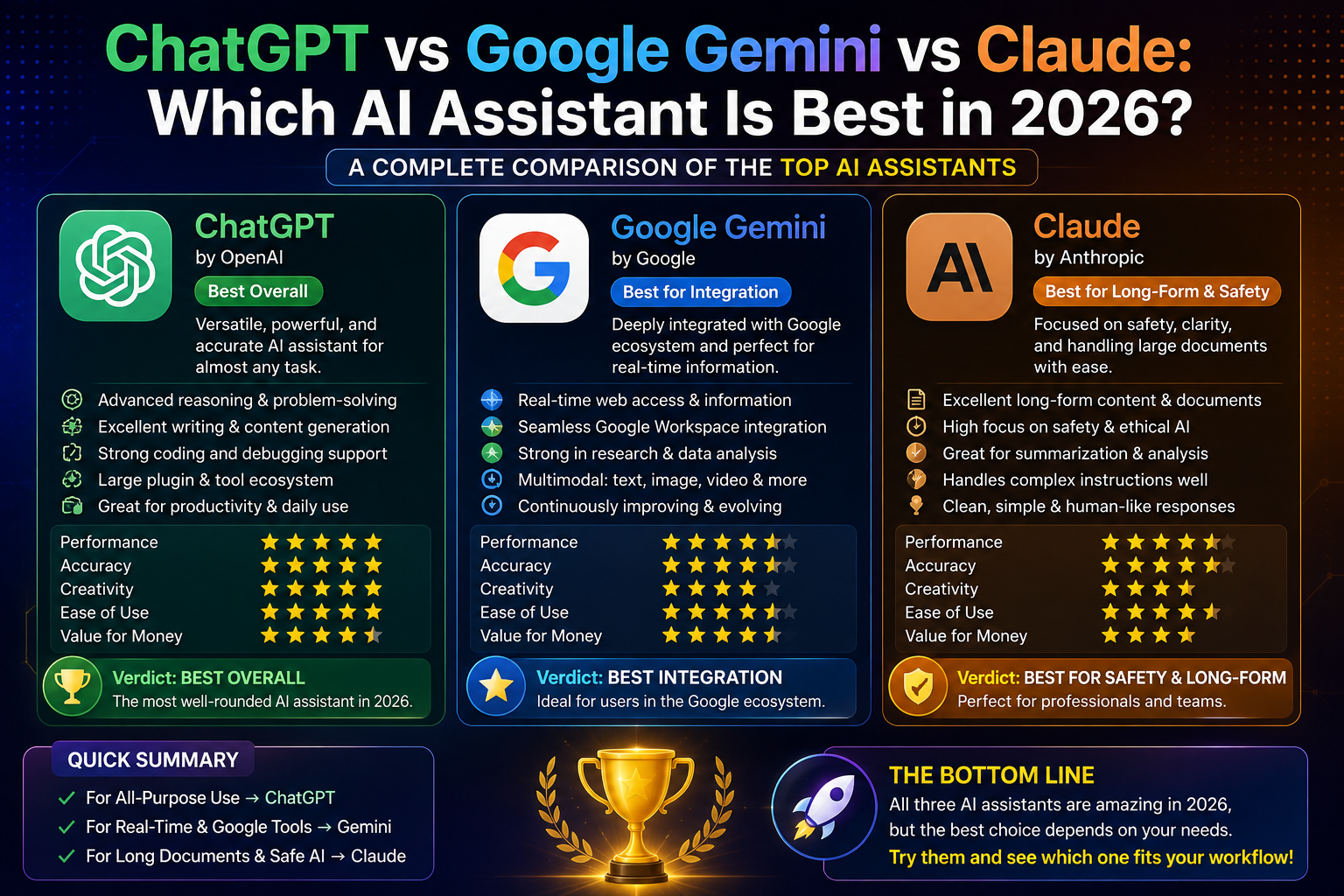
ChatGPT vs Google Gemini vs Claude: Which AI Assistant Is Best in 2026?
Artificial intelligence assistants have transformed the way we work, learn, and create. In 2026, three names dominate the AI landscape: ChatGPT, Google Gemini, and Claude. Each offers impressive capabilities, but they excel in different areas.
If you’re wondering which AI assistant is best in 2026, this detailed comparison breaks down their features, strengths, pricing, and ideal use cases to help you choose the right one.
Quick Comparison
| Feature | ChatGPT | Google Gemini | Claude |
|---|---|---|---|
| Best For | General productivity, writing, coding | Google Workspace & search | Long-form writing & document analysis |
| Writing Quality | ⭐⭐⭐⭐⭐ | ⭐⭐⭐⭐☆ | ⭐⭐⭐⭐⭐ |
| Coding | ⭐⭐⭐⭐⭐ | ⭐⭐⭐⭐☆ | ⭐⭐⭐⭐☆ |
| Research | ⭐⭐⭐⭐⭐ | ⭐⭐⭐⭐⭐ | ⭐⭐⭐⭐☆ |
| Creativity | ⭐⭐⭐⭐⭐ | ⭐⭐⭐⭐☆ | ⭐⭐⭐⭐⭐ |
| Large Documents | ⭐⭐⭐⭐☆ | ⭐⭐⭐⭐☆ | ⭐⭐⭐⭐⭐ |
| Image Generation | Yes | Yes | Limited/Depends on platform |
| Voice Features | Yes | Yes | Limited |
| File Analysis | Excellent | Excellent | Excellent |
| Ease of Use | Very Easy | Easy | Very Easy |
1. ChatGPT
Overview
ChatGPT is one of the most versatile AI assistants available. It combines conversational intelligence with powerful tools for writing, coding, brainstorming, image generation, data analysis, and productivity.
Best Features
- High-quality content writing
- Programming assistance
- Image generation
- Data analysis
- File uploads
- Brainstorming
- Business planning
- Language translation
- Study assistance
Strengths
- Excellent all-around performance
- Strong coding capabilities
- Natural conversations
- Great creative writing
- Fast responses
- Broad range of integrated tools
Limitations
- Some advanced features require a paid plan.
- Performance may vary depending on task complexity.
Best For: Bloggers, developers, students, marketers, educators, freelancers, and business professionals.
2. Google Gemini
Overview
Google Gemini is deeply integrated with Google’s ecosystem, making it an excellent choice for users who rely on Gmail, Google Docs, Sheets, Drive, and Google Search.
Best Features
- Gmail assistance
- Google Docs writing
- Spreadsheet analysis
- Search integration
- Calendar support
- Workspace automation
Strengths
- Excellent real-time information access
- Seamless Google Workspace integration
- Strong multimodal capabilities
- Useful for office productivity
Limitations
- Best experience is within Google’s ecosystem.
- Some advanced capabilities require premium plans.
Best For: Google Workspace users, students, researchers, and business teams.
3. Claude
Overview
Claude is particularly strong at handling long documents, thoughtful writing, and detailed analysis while maintaining context across extended conversations.
Best Features
- Long-form writing
- Document summarization
- Report generation
- Legal document analysis
- Technical documentation
- Research assistance
Strengths
- Excellent handling of lengthy inputs
- Clear, well-structured writing
- Strong reasoning on complex documents
- Consistent tone across long outputs
Limitations
- Feature availability can vary by platform and region.
- Fewer integrated creative tools than some competitors.
Best For: Writers, researchers, analysts, legal professionals, and anyone working with large documents.
Feature-by-Feature Comparison
Writing Quality
ChatGPT
Excellent for blog posts, marketing copy, emails, creative writing, and social media content.
Rating: ⭐⭐⭐⭐⭐
Gemini
Produces clear, professional writing and integrates well with Google Docs.
Rating: ⭐⭐⭐⭐☆
Claude
Outstanding for long-form articles, reports, and polished prose.
Rating: ⭐⭐⭐⭐⭐
Winner: ChatGPT and Claude (tie, depending on your writing style and needs).
Coding
ChatGPT
Excellent for:
- Python
- JavaScript
- C++
- Java
- HTML
- CSS
- SQL
- Debugging
- Code explanations
Rating: ⭐⭐⭐⭐⭐
Gemini
Strong coding assistance, particularly for general development tasks.
Rating: ⭐⭐⭐⭐☆
Claude
Good at explaining code and reviewing large code snippets.
Rating: ⭐⭐⭐⭐☆
Winner: ChatGPT
Research
ChatGPT
Great for summarizing information, organizing ideas, and analyzing uploaded files.
Rating: ⭐⭐⭐⭐⭐
Gemini
Benefits from strong integration with Google’s information ecosystem.
Rating: ⭐⭐⭐⭐⭐
Claude
Excels at synthesizing and analyzing long documents.
Rating: ⭐⭐⭐⭐☆
Winner: ChatGPT and Gemini (tie, with different strengths).
Creativity
ChatGPT
Excellent for storytelling, scripts, business ideas, and brainstorming.
Rating: ⭐⭐⭐⭐⭐
Gemini
Creative, but often more focused on factual and productivity-oriented tasks.
Rating: ⭐⭐⭐⭐☆
Claude
Strong at nuanced, long-form creative writing.
Rating: ⭐⭐⭐⭐⭐
Winner: ChatGPT and Claude
Productivity
ChatGPT
Helps with:
- Emails
- Presentations
- Spreadsheets
- Planning
- Writing
- Coding
- Data analysis
Gemini
Excels with:
- Gmail
- Google Docs
- Google Sheets
- Google Drive
- Calendar
Claude
Ideal for:
- Reports
- Research
- Documentation
- Long-form drafting
Winner: Depends on your workflow:
- ChatGPT for general productivity
- Gemini for Google Workspace
- Claude for document-heavy work
Pricing
Most of these AI assistants offer:
- A free tier with usage limits
- Paid subscriptions that provide higher limits and additional capabilities
The exact features and pricing can change over time, so check each provider’s official website for the latest details before subscribing.
Which AI Assistant Should You Choose?
Choose ChatGPT if you:
- Want one AI for many different tasks
- Write articles or marketing content
- Need coding assistance
- Create presentations or analyze files
- Value an all-purpose productivity assistant
Choose Google Gemini if you:
- Use Gmail every day
- Work in Google Docs and Sheets
- Want deep Google Workspace integration
- Rely heavily on Google services
Choose Claude if you:
- Write long reports or books
- Analyze lengthy PDFs and documents
- Need detailed summaries
- Prefer structured, long-form writing
Frequently Asked Questions
Which AI assistant is best overall in 2026?
There isn’t a single “best” option for everyone. ChatGPT stands out as a versatile all-rounder, Gemini shines within Google’s ecosystem, and Claude is particularly strong for long-form writing and document analysis.
Which AI is best for coding?
ChatGPT is widely regarded as one of the strongest choices for coding assistance, debugging, and learning programming.
Which AI is best for students?
All three can be useful. ChatGPT is excellent for explanations and study help, Gemini integrates well with Google Workspace, and Claude is helpful for reading and summarizing long academic materials.
Which AI is best for business?
Businesses often choose based on their existing tools: ChatGPT for broad productivity, Gemini for Google Workspace environments, and Claude for documentation-heavy workflows.
Can I use more than one AI assistant?
Yes. Many professionals combine different AI assistants to take advantage of their respective strengths—for example, using one for coding, another for document analysis, and another for collaboration within a specific productivity suite.
Final Verdict
If you want one AI assistant that performs well across writing, coding, research, brainstorming, and productivity, ChatGPT is an excellent all-purpose choice.
If your work revolves around Google Workspace, Google Gemini offers seamless integration with Gmail, Docs, Sheets, and other Google services.
If you regularly work with long documents, reports, or detailed writing projects, Claude is a compelling option thanks to its strong document handling and structured writing capabilities.
Ultimately, the best AI assistant in 2026 depends on your workflow rather than a universal winner. Many users get the best results by choosing the assistant that aligns most closely with the tools and tasks they use every day.